Turn Any PDF Into Excel Instantly
Stop wasting hours on manual data entry. Convert PDFs, scanned documents, and photos into fully editable spreadsheets with powerful OCR technology that captures every detail accurately.
Everything You Need for Seamless Conversions
Smart OCR Reads Any Document
Advanced OCR technology extracts tables and data from even low-quality scans and photos. Every row and column is captured precisely, eliminating manual typing and reducing errors for perfectly structured spreadsheets.
Convert Images and Photos Effortlessly
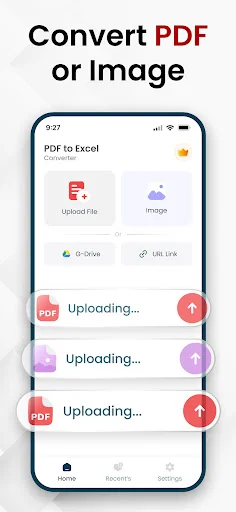
Snap a picture of any table or document and transform it into an editable Excel file instantly. Whether it's a printed report, invoice, or whiteboard notes, your data becomes actionable in seconds.
Export Back to Professional PDFs
Complete your workflow by converting finished spreadsheets back into polished PDF documents. Share reports and presentations in the format your clients and colleagues need, all from one powerful app.
Your Files Stay Private and Secure
Process all conversions directly on your device without storing any data. Work confidently knowing your sensitive information remains protected while enjoying fast, reliable results every time.
About PDF to Excel Converter & XLSX
PDF To Excel Converter - Turn Documents Into Editable Spreadsheets!
Managing tables and numbers becomes effortless with PDF To Excel Converter built for accuracy and speed. Whether you work with reports, invoices, or scanned documents, this solution transforms static files into fully editable Excel sheets. With support for images and scans, OCR To Excel Converter ensures every row and column is captured correctly. From daily tasks to professional data handling, everything becomes easier and more organized with JPG To Xlsx File Viewer.
Stop wasting time on manual typing with Excel To PDF Converter. OCR Image To Excel Converter App reads data directly from photos, scans, and PDFs, creating clean spreadsheets you can edit instantly. When you need to share results, Excel To PDF Converter lets you export files back into professional-looking documents with ease.
PDF To Excel Converter Key Features:
- Convert documents accurately for structured data;
- Use to extract tables from scanned files;
- Convert images effortlessly;
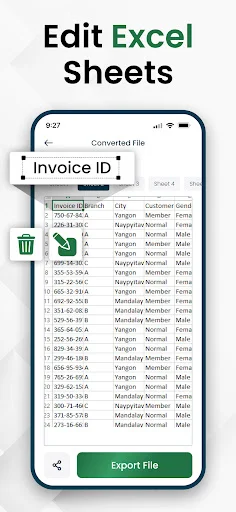
- Edit and review spreadsheets with built-in JPG To Xlsx File Viewer;
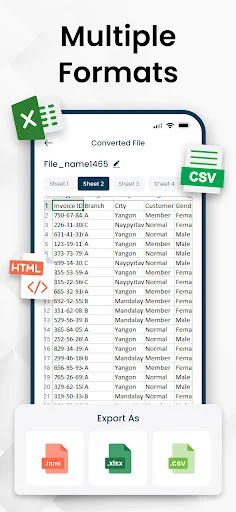
- Export results using Excel To PDF Converter in multiple formats;
- Capture tables instantly with our amazing Converter;
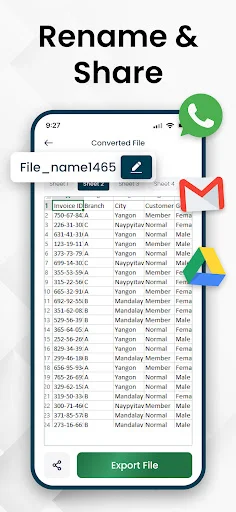
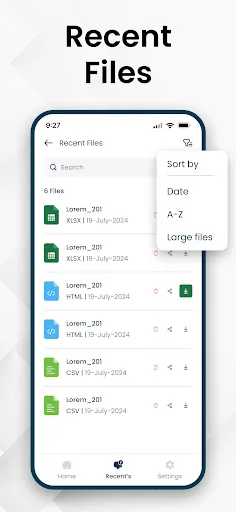
- Preview, crop, rename, and organize files before saving!
Smarter Data Extraction With OCR Precision
OCR To Excel Converter technology reads text and tables with high precision, even from low-quality scans. OCR Image To Excel Converter App ensures data stays aligned and readable, while Photo To Excel Converter allows quick imports directly from images. With PDF To Excel Converter, every spreadsheet is ready for editing without cleanup.
Flexible Formats For Every Task:
Export your work exactly how you need it. Excel To PDF Converter helps create shareable documents, while JPG To Xlsx File Viewer makes reviewing image-based spreadsheets simple. Whether converting reports or archives, PDF To Excel Converter keeps everything compatible and easy to manage.
Privacy, Speed, And Reliability:
Your files stay secure during every conversion with Photo To Excel Converter. OCR Image To Excel Converter App processes data quickly without storing content. Photo To Excel Converter and OCR To Excel Converter deliver reliable results every time, keeping your workflow smooth and stress-free.
Transform PDFs, Images, And Photos Into Excel Instantly
From scanned paperwork to photos of tables, PDF To Excel Converter simplifies data handling. Use the OCR To Excel Converter for accuracy, speed, and professional exports. With the OCR Image To Excel Converter App, spreadsheet management has never been this efficient.
Disclaimer
All product names, logos, brands, trademarks, and registered trademarks, which are not owned by us, are the property of their respective owners. All company, product, and service names used in this app are for identification purposes only. Use of these names, trademarks, and brands does not imply endorsement.
This app is owned by us and is not an official Excel application. We are not affiliated, associated, authorized, endorsed by, or in any way officially connected with Microsoft Corporation.
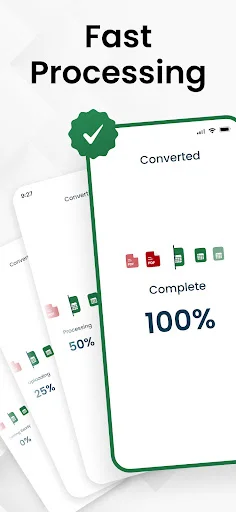
See How Simple Data Conversion Can Be


Join Thousands of Happy Users Who Save Time Daily
Excellent app for converting tabular data images into Excel it's safe my time to convert bank statements and invoices into editable Excel sheets. Download it and keep enjoying smart conversions and safe times.
Convert PDF to Excel in seconds! I want to extract tables, numbers, or data from pdfs into fully editable Excel sheets. These PDF to Excel converter apps make it effortless. No More Manual Data Entry ✨️😊👍
Literally the ONLY app that serves it's purpose. After downloading numerous useless Apps this is the only one who actually did what I was looking for hours for.
Tried about 10 different apps to convert my PDF data tables to excel, and this one worked phenomenally - the other apps weren't even close.
It has a free trail. It works perfectly for Burmese Language. Can be exported to CSV format as well. it works perfectly for me.
excellent app its very useful its convert my data into fully editable excel sheet 💯🔥☺️
Download Now and Transform Your Workflow Today
Join hundreds of thousands of users who have already made the switch