Merge, split, and secure PDFs in seconds
Combine files, split pages, lock PDFs, delete pages, and share anywhere – all from your phone, even offline.
Tools built for busy workflows
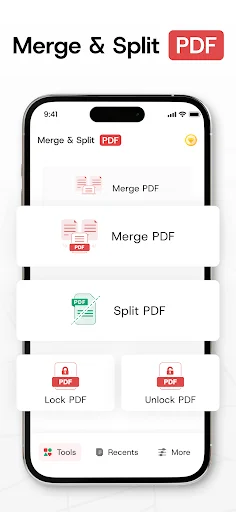
Merge PDFs in seconds
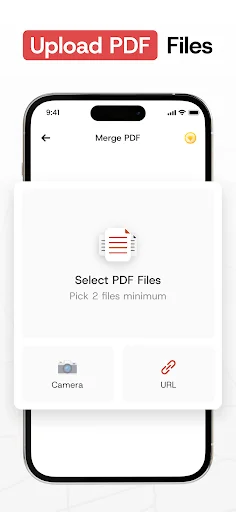
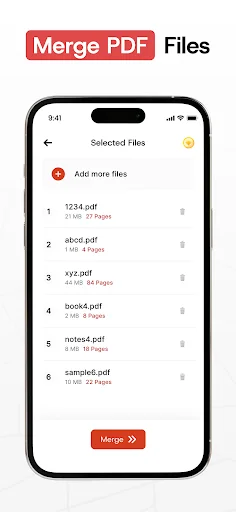
Combine multiple files into one clean document without losing quality, with no limits on merges. Import from your gallery or create a new text PDF to merge in a few taps.
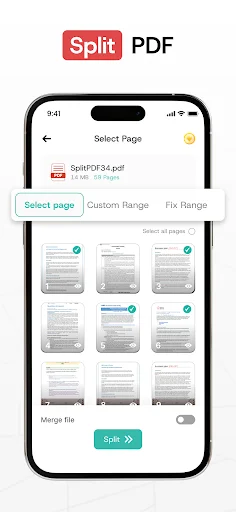
Split and extract pages
Turn large PDFs into smaller files that are easy to send and store. Extract specific pages or sections fast to share only what matters.
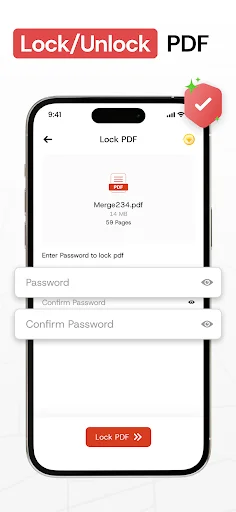
Protect with passwords
Lock sensitive PDFs with a password or unlock them when you need access. Keep control of who can view your documents.
Delete pages, share anywhere
Remove unwanted pages to tidy up your files. Share merged or split PDFs via email, messaging apps, social media, or cloud services – even without internet.
About Merge PDF - Split PDF Files
Looking for a fast and secure way to Merge PDF & Combine PDF files into one file?
Our Merge PDF—Split PDF is a powerful free tool for merging PDF files into one file. It allows you to combine PDF files or split PDF pages effortlessly to manage your documents efficiently. With its fast merging speed, you can confidently combine PDF files into one file, ensuring all your PDFs are seamlessly merged without losing content or quality.
In addition, the Merge PDF and Combine PDF App provides a complete set of tools for managing your PDFs. You can split large PDF files into smaller ones. The app lets you easily lock and unlock PDFs, giving you full control over document access.
How to Use?
Choose PDF files directly from your gallery or create a new text-based PDF and merge it with others using the PDF merger and PDF Combiner all with just a few taps!
Key Features PDF Merger and Splitter App:
- Combine PDF Files into one File: Easily combine multiple PDF files into one. Import PDFs from your gallery or create a new text PDF to join PDF files and merge it with existing documents.
- Split PDF pages Have a large PDF that needs to be divided? Our app lets you split PDFs into smaller, manageable files. Extract pages or separate sections quickly and easily to suit your needs.
- Lock and Unlock PDFs. Enhance your document security by easily locking your PDFs with a password to protect sensitive information, or unlock them when needed. Secure your Split PDF pages with a password, ensuring that your private or important files stay safe and protected from unauthorized access.
- Delete Pages from PDF: With a simple tap, remove unwanted or unnecessary pages from your PDF file, streamlining your document for a more concise result.
- Share Across Platforms: Using the PDF Joiner, quickly share your merged PDFs on various social media platforms or through email, messaging apps, and cloud services.
- Unlimited Merging: Merge as many files as you want, whenever you want.
Why Choose Us?
PDF Merger and PDF Combiner App is designed to make merging PDFs as simple and accessible as possible. Whether you're managing your work documents or organizing class notes, the Merge pdf and Combine PDF app will streamline your tasks. PDF joiner is perfect for students, professionals, and anyone who regularly handles multiple PDFs. Plus, it works flawlessly with or without an internet connection.
Who Can Use pdf merger and splitter?
- Teachers & Educators: Organize lesson plans and resources and merge PDF files into one file for easy distribution.
- Business Professionals: With the PDF merger and PDF combiner features, combine reports and presentations into one polished document, ready for clients or colleagues.
- Legal Professionals: Use the PDF Joiner to consolidate contracts and filings into secure PDFs for easy submission and review.
- Real Estate Agents: Create a complete property profile with listings, documents, and contracts to combine PDF files into one file.
- Healthcare Professionals: Use the PDF Combiner App to rearrange pdf pages of patient records and reports for streamlined, secure sharing with medical teams.
- Freelancers: Use Join PDF to send clients invoices, contracts, and project deliverables as one organized PDF file.
Ready to take control of your PDFs? Download the Merge PDF—Split PDF app today and combine PDF files into one file! With its easy-to-use features and cross-platform sharing options, you'll never struggle with scattered documents again.
See the PDF tools in action


Loved by 100,000+ users – 4.7 rating
this app is totally easy to understand just in seconds and it's for free
best application for merging your pdf in seconds.
no data collected and simple application to use
Great app for merging PDF files.
first app that works, i like it
Fast and No Ads. I recommend
Download now – take control of your PDFs
Join hundreds of thousands of users who have already made the switch