Organize Your PDFs in Simple Steps
Split large documents, merge scattered files, and rearrange pages with ease. Clean up messy PDFs for work, school, or personal use without complicated tools.
Everything You Need to Manage PDFs
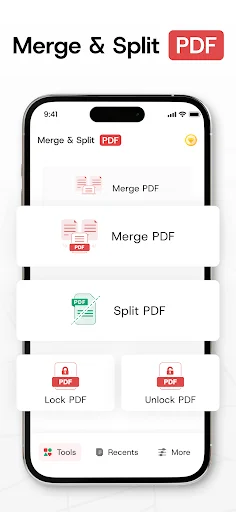
Split Large Files Fast
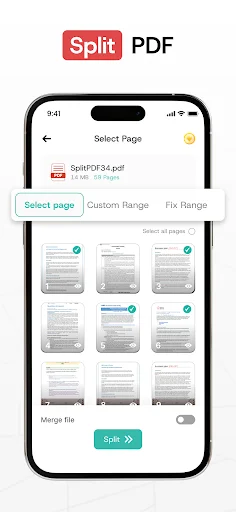
Break down long documents into smaller, focused files that are easier to share and organize. Extract important pages or create separate sections from reports, contracts, and study materials in seconds.
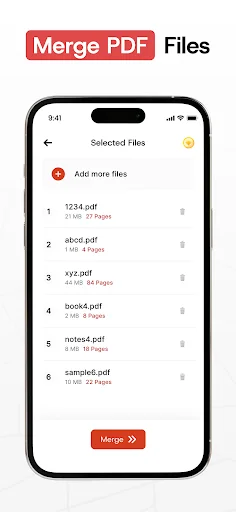
Merge Multiple PDFs Together
Combine scattered files into one clean document. Join class notes, receipts, forms, and work papers without switching between different apps or losing track of your files.
Rearrange Pages Perfectly
Fix page order issues that happen after scanning or saving documents. Move important pages forward and place attachments where they belong so your final file looks professional and makes sense.
Remove Unwanted Pages Easily
Delete extra pages you no longer need and keep only what matters. Create lighter, cleaner files that are ready to send, store, or present without unnecessary content slowing you down.
About Merge PDF - Split PDF Files
PDF Splitter And Merger - Manage PDF Files In Simple Steps!
PDF Splitter And Merger helps you organize documents when your files feel messy, long, or scattered. You can join pages, separate sections, remove extras, and keep important PDFs easier to handle.
PDF Split And Merge is useful for school notes, work reports, forms, contracts, invoices, and personal documents. PDF Merger And Splitter keeps the process simple, so you can clean up files without confusing tools.
Main Features
- PDF Separator Tool - Split large documents into smaller files.
- Resize PDF Splitter Free - Cut, adjust, and manage pages.
- Combine PDF Cutter - Join files and remove unwanted pages.
- Rearrange PDF Pages Tool - Move pages into the order you need.
- PDF Splitter And Merger - Manage split and merge tasks in one place.
- PDF Split And Merge - Organize reports, notes, forms, and documents.
- PDF Merger And Splitter - Handle files with quick controls.
Split, Combine, And Organize Documents!
PDF Separator Tool helps when one large file needs to become smaller and easier to share. You can separate chapters, extract useful pages, or create cleaner document sections. Resize PDF Splitter Free gives you more control when you need trimming or page adjustments. It works well for users who want a lighter file before saving, sending, or storing it.
Combine PDF Cutter helps when several PDFs belong together in one clean document. You can merge class notes, office papers, forms, receipts, and project files without jumping between different tools.
How To Use
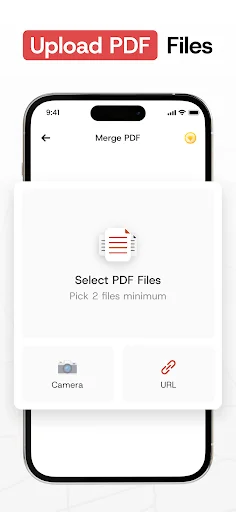
- Open PDF Splitter And Merger and choose your files.
- Use PDF Split And Merge to pick the action you need.
- Select PDF Merger And Splitter for joining or separating files.
- Choose PDF Separator Tool to extract pages from a large document.
- Try Resize PDF Splitter Free when you need a cleaner file size or page setup.
- Use Combine PDF Cutter to join documents into one file.
- Finish with Rearrange PDF Pages Tool to place pages in the right order.
Smart Tools For Work, Study, And Daily Files
Rearrange PDF Pages Tool is helpful when pages appear in the wrong order after scanning or saving. You can move important pages forward, place attachments near the right section, and make the final file easier to read.
PDF Splitter And Merger also supports everyday document cleanup for students, teachers, office users, freelancers, and anyone who handles PDFs often. Instead of keeping scattered files, you can build a neat document that feels ready to share.
PDF Split And Merge makes routine tasks faster when you need quick changes before sending a file. It can help you prepare assignments, reports, legal papers, property files, invoices, or medical documents with fewer steps.
Why Choose This App?
PDF Merger And Splitter gives you a practical way to control files from one simple app. It keeps document editing clear, whether you need to merge pages, split sections, or remove parts you no longer need. PDF Separator Tool is great for turning long files into smaller, more focused documents. Resize PDF Splitter Free adds extra value when your documents need simple adjustments before sharing.
Combine PDF Cutter helps you create one organized file from many separate documents. Rearrange PDF Pages Tool keeps your final document neat, readable, and ready for school, work, or personal use.
See How Simple PDF Management Can Be


Join Thousands of Happy Users
this app is totally easy to understand just in seconds and it's for free
best application for merging your pdf in seconds.
no data collected and simple application to use
Great app for merging PDF files.
first app that works, i like it
Fast and No Ads. I recommend
Start Organizing Your PDFs Today
Join hundreds of thousands of users who have already made the switch